Development
Project Structure
docs
Contains all documentation for the reprostim project and RTD configuration.
src/reprostim
Contains all code for reprostim library. Represented as a set of Python
APIs, tools and utilities under the umbrella of the reprostim library,
where each tool is a separate subcommand of the reprostim CLI.
src/reprostim-capture
Contains all code needed for setting up reprostim-videocapture. This
includes C++ code for interfacing with the video capture device, and
scheme for setting up a video-capture server, along with helper
utilities.
This subproject is set of native C/C++ tools and utilities to capture video/audio signals with Magewell USB Capture devices and save it to a file. More detailed information about dependencies and installation provided in reprostim-capture README.md.
tests
Directory with reprostim pytests and test data.
tools
Placeholder for utility scripts which are used outside the Python package, potentially for configuration or monitoring of the deployment. Some scripts could potentially be later recoded and included in the Python package.
reprostim-capture
Overview
reprostim-capture project is set of tools and utilities to capture video/audio signal with Magewell
USB Capture devices and save it to a file. It is a part of the ReproStim project.
Dependencies
On Debian:
apt-get install -y ffmpeg libudev-dev libasound-dev libv4l-dev libyaml-cpp-dev libspdlog-dev catch2 v4l-utils libopencv-dev libcurl4-openssl-dev nlohmann-json3-dev cmake g++
Optionally, in case con/duct tool is used and conduct_opts.enabled is set to true in reprostim-videocapture config.yaml:
    apt-get install -y python3-pip
    python3 -m venv venv
    source venv/bin/activate
    pip install con-duct
    duct --version
Project requirements:
OS Linux
g++ (C++20)
CMake 3.10+
Packages:
Magewell Capture SDK for Linux 3.3.1.1313
libv4l2
libv4l-dev
libudev-dev
libasound-dev
libyaml-cpp-dev
libspdlog-dev
libopencv-dev
libcurl4-openssl-dev
nlohmann-json3-dev
catch2
v4l-utils
ffmpeg
pip+con/duct (optional)
Build
reprostim-capture uses CMake as build system. To build the project, run the following commands:
    cd src/reprostim-capture

    mkdir build
    cd build
    cmake ..
    make
Installation
To install the project, once the build done, run the following command:
    cd src/reprostim-capture

    sudo cmake --install build
It will copy all necessary files to the /usr/local/bin location (reprostim-videocapture,
reprostim-screencapture, reprostim-nosignal).
Project Structure
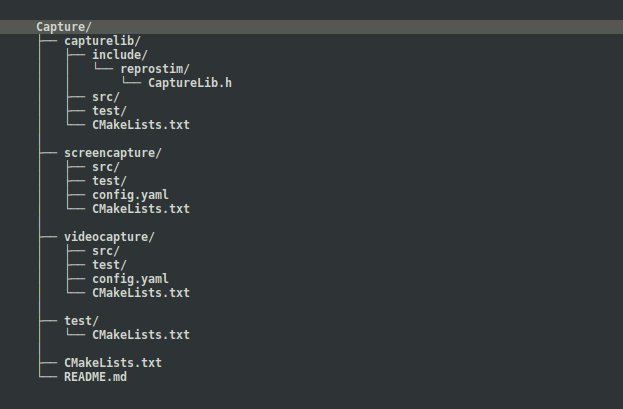
reprostim-capture project consists of the following components:
capturelib- shared static C++ library with common code across all utilities.screencapture- project source code for “reprostim-screencapture” command-line utility. The program captures screenshots from Magewell USB Capture device and saves it as series of image files (*.png).videocapture- project source code for “reprostim-videocapture” command-line utility. The program captures video/audio streams from Magewell USB Capture device and saves it as video file (*.mkv).
Both utilities use capturelib as a shared library.
All projects C++ code live in the reprostim namespace. So in general, the project
structure looks like this:
Versioning
Current model consists of two versions: explicit and implicit. Explicit version is specified in “version.txt” file and considered as the main one. Implicit version is a git describe tag reported in –version output as “Build tag”.
All projects (capturelib, screencapture, videocapture) use the same versioning data. It is stored in “version.txt” file in the root of the project. This is plain text file with the following content: “{MAJOR}.{MINOR}.{PATCH}.{BUILD}”. The file is used to set the version. Where {MAJOR}, {MINOR} and {PATCH} values should be set manually. While {BUILD} value can be automatically updated by the build system in IDE or similar.
We also have CMake script “version-auto-inc.cmake” which can be used to increment build number in version file during development process:
        cd src/reprostim-capture

        cmake -P version-auto-inc.cmake
E.g. in CLion IDE, you can add “version-auto-inc.cmake” as External Tool under “Settings -> Tools -> External Tools”:
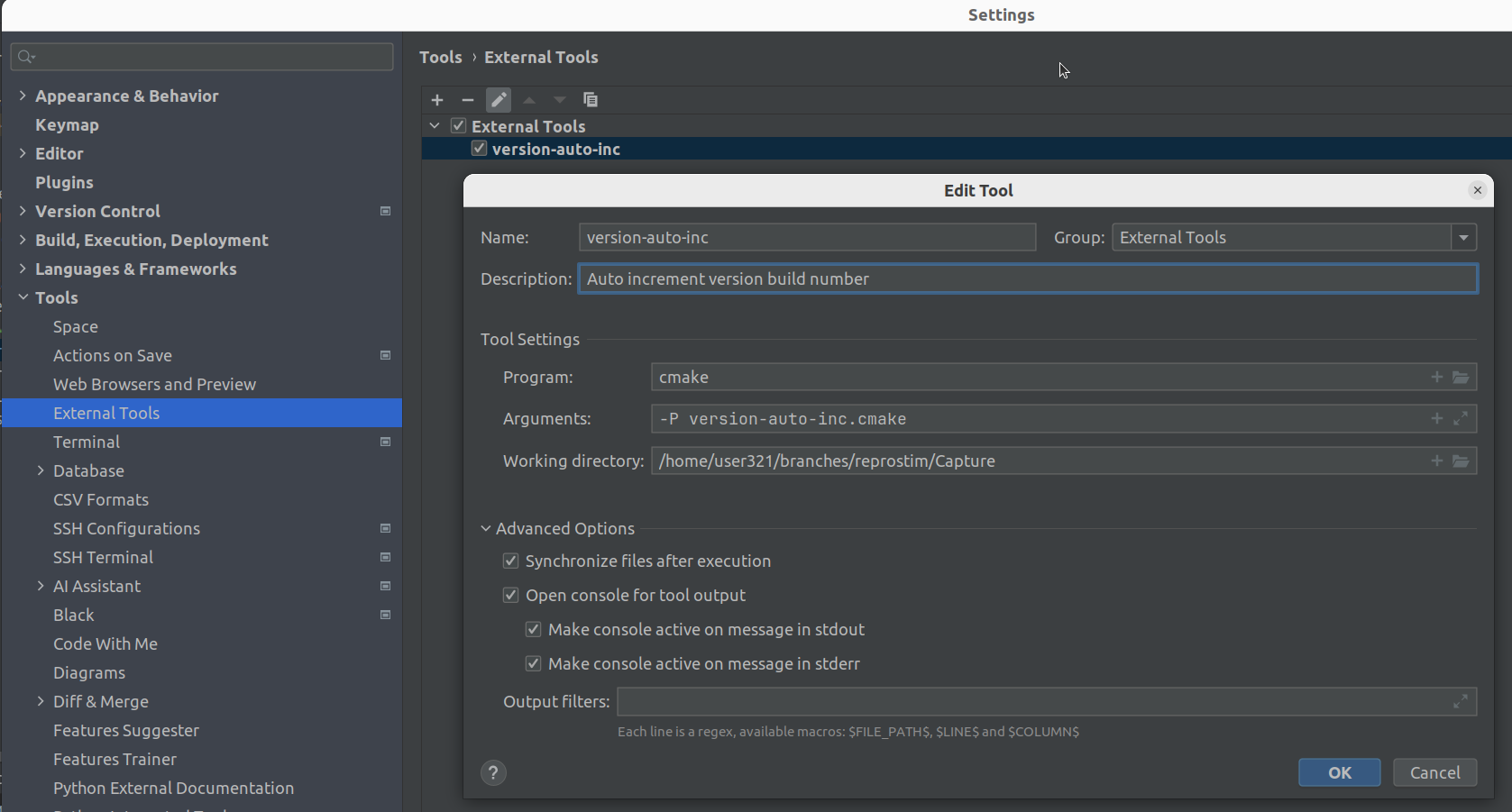
Then you can run it from the IDE to increment build number manually or integrate it with build process (as pre-build hook) to increment build number automatically.
Testing
In short words project uses CMake + CTest + Catch2 for unit testing. To run tests, build project and execute the following command:
    cd src/reprostim-capture/build
    ctest
Root project and each subproject have their own tests located in the “test” directory along with CMakeList.txt and C++ sources.
Tests build process controlled by CMake option CTEST_ENABLED. If it is set to ON
(default value), tests will be built. If it is set to OFF, tests will be skipped (can
be useful for development in IDE under some circumstances to skip tests and reduce
compilation time).